Running in 500+ MR.DIY stores across India

Digital signage, managed at scale.

Turn any TV into a digital signboard. Show ads, offers, announcements and menus, and update every screen in every store from one dashboard.
  • 500+ storesMR.DIY, India
  • Real-world deploymentIn production today
  • Centralized managementOne dashboard
New in store

Fresh finds for every room.

Kitchen · Home · Tools

This weekend

Buy 2
get 1 free

On selected storage

Today's menu

  • Masala dosa₹90
  • Veg thali₹160
  • Cold coffee₹70
  • Filter coffee₹40
Store update

Open 10 am to 10 pm, all week.

Ask our team for help finding anything.

Sample contentAdvertisements
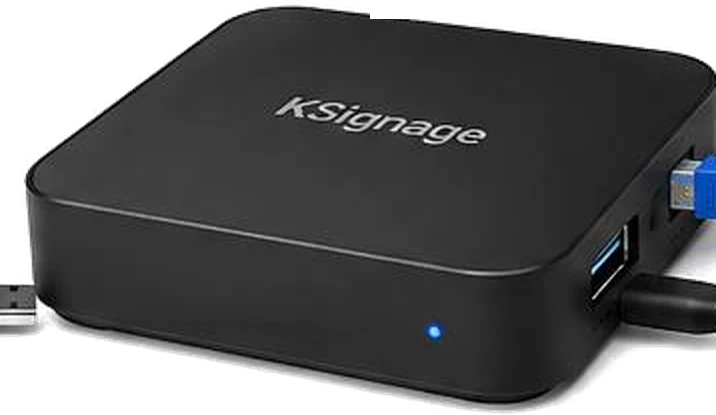
The Ksignage player, a compact Android box that connects to the TV over HDMI

Trusted by MR.DIY to run in-store screens across India

  • 500+ stores
  • 172 cities & towns
  • 19 states & UTs

Show anything, on any screen.

Videos and images, in landscape or portrait, on any TV with an HDMI port.

Advertisements

Promote new products and brands right where shoppers decide.

Offers and campaigns

Launch a sale in every store at once, then take it down just as fast.

Menus

Keep prices and dishes current without reprinting a single board.

Announcements

Share store timings, notices and updates with customers and staff.

Dashboards

Show dashboards and reports to your team on a wall screen.

Regional languages

Run the same campaign in Hindi, Marathi or any language, region by region.

Works with the TV you already have.

The Ksignage player is a compact Android box. Plug it into any TV with HDMI, connect it to the internet, and it starts playing your content.

  • Any TV with HDMINo special display needed.
  • LAN or Wi-FiContent updates arrive over the store's internet.
  • Starts on its ownAfter a power cut, the app opens and playback resumes.
  • Remote shortcutsSwitch playlist, rotate the screen or show the device ID with one key.
Ksignage Android player box
  1. 1Connect power
  2. 2Connect HDMI to the TV
  3. 3Connect LAN or Wi-Fi
  4. 4Select the HDMI input

One dashboard. Your entire signage network.

Upload once, choose which screens get it, and see which players are online. This is the real Ksignage dashboard.
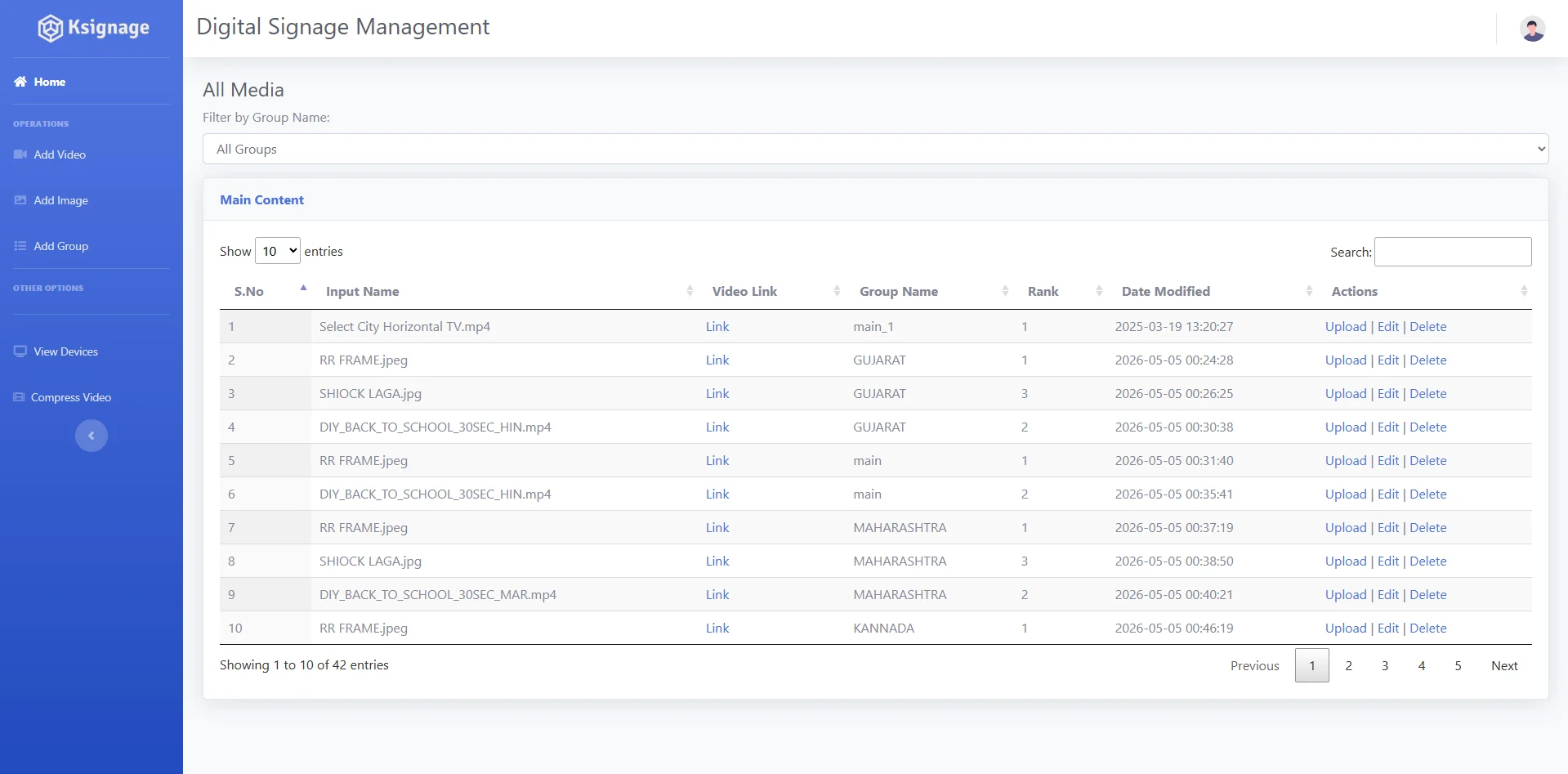
Ksignage dashboard, All Media screen: a table of uploaded videos and images with their group, rank and date modified, filterable by group.
1
Filter by groupSee exactly what plays in Gujarat, Maharashtra or any other group.
2
Rank sets play orderChange a number to reorder a playlist.
3
Upload, edit, deleteManage every item from the same row.

Everything you need to run your screens.

The tools your team uses every day to get the right content onto the right screens.

Video and image library

Upload MP4 videos and images, filter them by group, and edit, replace or delete any item.

Built-in video compression

Upload a video with or without compression, or run it through the Compress Video tool first.

Groups

Organise screens and content into groups, such as by state, language or screen orientation.

Play order

Give each item a rank to set the order it plays in on every screen in the group.

Device registry

Every player listed with its store, group, status, licence expiry and last check-in. Move selected players to a new group in one step.

Players that keep themselves in sync

Players fetch new content from the Ksignage server on their own, with no one needing to touch them in the store.

From upload to every screen in four steps.

  1. 01

    Upload

    Add your images and videos.

  2. 02

    Organize

    Group content by region, store or campaign.

  3. 03

    Deploy

    Push content to the required screens.

  4. 04

    Monitor

    Track your deployed network from one place.

Case study MR.DIY India

Built for real-world retail scale.

Ksignage powers digital signage across 500+ MR.DIY stores in India, enabling centralized content distribution across a geographically distributed retail network.

MR.DIY stores
500+
Players in use
386
Online in the last 24 h
78%
Cities & towns
172
States & UTs
19

Our network, on one map

445 store locations from Jammu to Kochi

One upload, every store
Content is uploaded once, assigned to a group and picked up by every player in that group.
Regional content
Separate content groups for Maharashtra, Gujarat, Kannada and Telugu markets, so one campaign can run in Hindi in one region and Marathi in another.
Mixed screen formats
Dedicated groups for vertical screens, with orientation set on the player itself.
Store hardware
A Ksignage Android player per screen, connected over HDMI and online through the store's LAN or Wi-Fi.
Talk to us about your stores

Player and map figures come from the Ksignage device registry, snapshot of 30 Sep 2026. In use: checked in during the previous 30 days. Online: checked in within 24 hours. Stores are placed at city level.

Ready to manage your digital signage at scale?

Let's talk about your digital signage network.

Request a Demo

Request a demo

Tell us about your stores and screens. We'll walk you through the dashboard and how a rollout would work for your network.

  • A live look at the device registry and content library
  • How players are set up in each store
  • How content groups would map to your regions
Enter your name.
Enter your company name.
Enter a valid email address, like name@company.com.
Use digits, spaces and + ( ) - only.
Write at least 10 characters.
* Required